

World Weather Clock Widget
con satok

World Weather Clock Widget
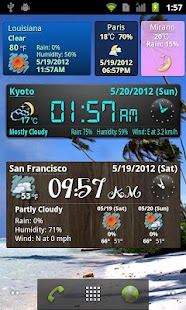
Check weather forecasts and current conditions, time and date for any location.
And you can check 5 days detailed forecasts.Plus, you can check the current weather and the rain fall probability in the status bar.(new!)And you can check the rain radar, satellite view and map for the location.
(Please feel free to send any request and question by email.
We are always welcome to hear them and improve our aplication.)* If this application is not found in the list of the widget, please check whether this is moved to SD card or not, then please move to the internal storage.* The usage of the reconfiguration is explained on the bottom.
* Ver5.18 Ver5.20 Ver5.21 has a critical bug, please update the application to the latest version.
Features:* GPS based forecast (Including wind, humidity, rain probability)* You can check the rain probability and weather forecasts all over the world (197+ countries).* Show the forecast in the status bar.* 3 icon styles and 4 backgrounds* Weekly weather forecasts* Compact display mode for incompatible handsets* Show a day, day of the week and year in the widget* Settings for refresh rate and time adjustment* Translations for 20+ languages
Notice:*The location of GPS and forecast information are updated every one hour.
If you want to update now, please tap "Update now" button.*If there are some errors, please reinstall the app then reboot the handset.*If timezone is different, please send it by e-mail.
Usage:* How to reconfigure the widget settings1.
Tap a widget and open weekly forecasts2.
Click a menu button3.
Tap the "configure" button
(world, weather, forecast, clock, date, rain, humidity, wind)English name: World Weather Clock WidgetOld name: World Forecast Clock Widget
Author: satok, Symrophttps://twitter.com/satok_Since: 10 Jul 2009
About World Weather Clock Widget
- Package name (App ID)
- org.satok.gweather
- Available on
- Google Play
- Price
- Free
- Version
- v8.027
- Updated
- April 10, 2022
- Developer
- satok
Looking for the World Weather Clock Widget APK?
The safest way to get World Weather Clock Widget (org.satok.gweather) on your Android device is to install it directly from Google Play — you'll always get the latest official version, automatic updates, and no risk of modified or infected APK files from third-party sites.

Social Features
Connect and share with friends and the community.
Gaming Features
Enjoy immersive gaming experience with various game modes.
Weather Features
Get accurate weather forecasts and real-time updates.
Guarda World Weather Clock Widget in azione


Cosa dicono i nostri utenti
Non fidarti solo della nostra parola. Ecco cosa dicono i nostri utenti di questa app Android.
"Good"
"Very beautifull Apps 💕🌹🌹🌹"
"Very good application. Get stuck frequently at previous date and time, requires refreshing to bring to current date and time. Uninstalled this application and tried other application 'Simple World Clock" , it is working fine now."
"The widget looks good and it works brilliantly as well. Luv it 😉"
"Crash multiple times trying set up"
"I like the app but I am unable to use it because the clock does not update properly. Is there any fix for that?"
"I've used it for years and still love it. But stopped working the first days of 2022... hope it gets fixed"
"Nice... thx!"
"It's been about 10 years with this app. I still love it and do not regret getting it."
"Love it. Beautiful, works greatly and easy to use."
Frequently Asked Questions
Is World Weather Clock Widget free?
Yes, World Weather Clock Widget is free to download and install on Android through Google Play.
How do I install World Weather Clock Widget on Android?
Open Google Play on your Android phone or tablet, search for World Weather Clock Widget by satok or tap the Google Play button on this page, then tap Install. The app downloads and installs automatically.
What is org.satok.gweather?
org.satok.gweather is the App ID (package name) of World Weather Clock Widget on Google Play. Every Android app has a unique package name, and it is the safest way to verify you are installing the official app.
Is World Weather Clock Widget safe to download?
Installing World Weather Clock Widget from Google Play is the safest option: you get the official version published by satok, verified by Google Play Protect, with automatic updates. Avoid APK files from unofficial third-party sites.
Get World Weather Clock Widget Today
World Weather Clock Widget for Android — free download on Google Play.
Compatible with Android phones and tablets — available on Google Play.
Chiedi all'IA su questa app
Ottieni risposte istantanee su funzionalita, suggerimenti e altro.